Handover
Report package
PDFXLSXMedia

Team inspection dashboard
Latest 360air.space server activity, creation details and inspector contributions
| Inspection | Aircraft / Component | Status | Findings | Media | Last activity |
|---|
Finding-linked images and videos on the 360air.space server.
Choose an inspection and the output you need.
Manage customer users and roles.
| User | Role | Status | Team connection | Last sign-in | Manage |
|---|
Use this help page for normal customer operation: sign-in, shared inspections, automatic numbering, offline work, finding review, optional finding state, media, image annotations, exports, archives and team administration. 360air.space server administrators also find the guided customer-user and device-management workflow here.
Open the CabIQ invitation email, accept the invitation and choose your own password. If the link cannot be used, select Use invitation code on the sign-in page and enter the code from the email.
Open the gear icon, choose Connect to CabIQ Hub, then sign in with your work email and password. The customer release uses the managed Hub configuration; users do not enter a Hub URL or publishable app key.
Use Forgot password? on the Hub sign-in page. Customer Administrators can also send a password-reset email from Team & Access. Administrative password reset immediately revokes the user’s existing CabIQ sessions on all devices; local unsynchronized inspection data is preserved and the user signs in again with the new password. Existing passwords are never shown.
Administrator: manages users, roles, connected Team users, Hub inspection creation, finding review, optional finding state, final actions and server-retention actions. Customer branding is managed centrally by 360air.space.
Lead: performs inspection work, reviews and corrects finding descriptions, can set the optional finding state, enters final actions and can request completed server-copy removal after archiving.
Inspector: creates and updates findings, adds media and performs normal inspection work.
Viewer: review-oriented access where enabled.
Customer roles apply only inside the current organization. Customer users cannot see other CabIQ customers.
CabIQ Team can start Aircraft or FAI/SI inspections from the Home screen. Customer Administrators can also create inspections from New inspection in CabIQ Hub.
Use In Progress for active Team inspections and Completed for completed work. In Hub, open Inspections to search shared server projects.
Aircraft projects capture airline, type, MSN, registration, location, MRO and check type. FAI/SI projects capture supplier/component project information.
Automatic numbering uses one coordinated finding-number sequence across the complete inspection team. Each device reserves a unique block of 20 numbers so inspectors can continue offline without duplicates.
When about 5 numbers remain, CabIQ tries to reserve another block automatically. The next block may not be consecutive for that inspector because other devices may own the numbers in between.
If every reserved number is consumed while the device is offline, reconnect to CabIQ Hub once. CabIQ reserves another block and work can continue. Unused reserved numbers are not recycled; gaps are acceptable.
Other modes are No finding numbers and Optional number or reference.
CabIQ is local-first. Saved findings and media are protected on the device before network synchronization.
If the cloud icon shows offline, continue working. Pending findings and media synchronize automatically after validated internet access returns. Long-running sessions refresh automatically where possible; if a session cannot be refreshed, sign in again from Settings.
If the same finding was changed independently on different devices, CabIQ can flag a conflict rather than silently overwrite another inspector's work.
A finding can include a visible number/reference, title, description, severity, requested action and photo/video evidence. Save writes locally first.
For good evidence, capture one context image and a close-up where needed. Media is private to the customer organization and linked to the finding.
Videos remain original evidence. If the browser cannot decode the source phone codec, CabIQ Hub creates and caches a browser-compatible playback preview while keeping the original video unchanged.
Review / edit is available to Lead and Administrator users. The original mobile field note is always preserved as read-only evidence, while Reviewed description can be corrected or expanded for professional reporting.
When a reviewed description exists, PDF and XLSX reports use the reviewed wording. If no reviewed description exists, reports use the original mobile field note. Review history keeps earlier Hub revisions traceable.
State is a separate optional column in the finding list, positioned between Final Action and Updated. It is not part of the review/edit window and it is not mandatory.
Available states are Not set, Open, Accepted / Closed, Closed / No action and Other… for a short free-text project state.
Use State where a formal disposition is useful, for example FAI, Source Inspection, incoming inspection, supplier-quality or delivery workflows. For normal aircraft inspections it can simply remain Not set.
Final Action and State are different: Final Action records what was done or agreed; State records the optional disposition/closure status.
Open a picture from a finding or the Media page and select Annotate image. Tools include arrow, circle, rectangle, freehand, text, colour, line width, Undo and Clear annotations.
On save, choose Replace original to keep the edited picture in the same media position, or Save as additional image to keep the original and add the annotated picture as another media item.
Only pictures can be edited. Videos remain view-only.
Overview: inspection, finding and media totals plus recent activity.
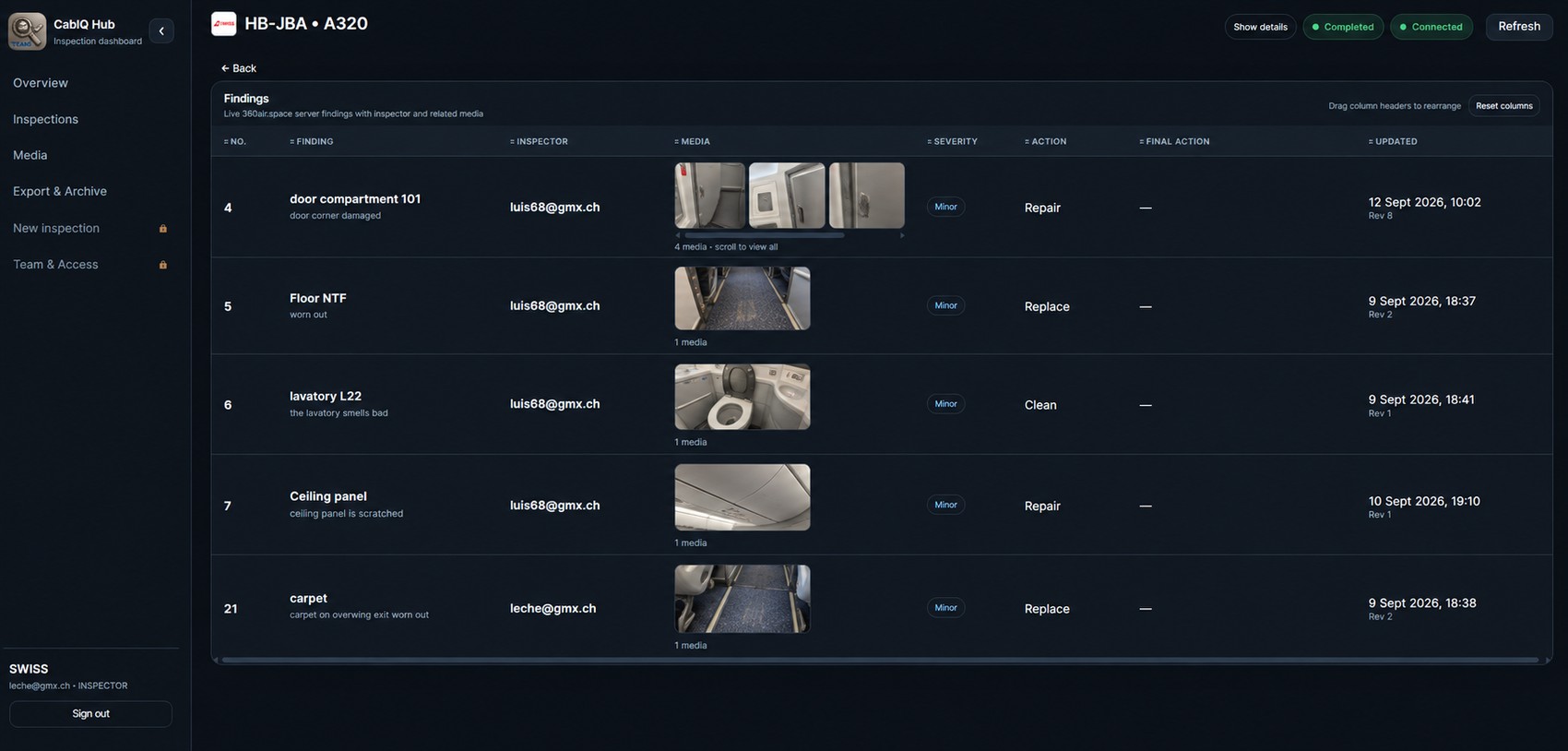
Inspections: search/open shared projects and the complete server finding list, including Hub review/editing, Final Action and the optional State column.
Media: all shared finding photos/videos, including image annotation.
Export & Archive: handover reports, full CabIQ archives and server retention.
New inspection: Administrator-only project creation.
Team & Access: Administrator-only user, role and Team-presence administration.
Register users with name, work email and role. The user receives a welcome invitation and chooses their own password. Roles can be changed later; password resets send a recovery email and revoke the user’s existing CabIQ sessions so a fresh sign-in is required.
The Team connection column shows who is currently connected, device details and last-seen information. CabIQ Team sends a lightweight heartbeat every 30 seconds while foregrounded, signed in and online. Presence does not itself send inspection content.
Before deleting an active inspector, make sure their device has synchronized pending work.
Report package: PDF + XLSX + original media for normal handover. PDF/XLSX use the Reviewed description when available and include the optional State when it is set.
Full CabIQ archive: report files plus project data and checksums so the project can be reopened later. Keep the archive ZIP/folder itself as the source of truth. The browser shortcut to a local archive is visible only to the CabIQ account and customer organization that registered it.
After a completed inspection has a verified full archive, an authorized Lead or Administrator can request removal of the active 360air.space server copy. A protected recovery copy remains for one calendar month; during that period the removal can be cancelled. After the deadline, deletion becomes permanent.
Open Customers → Manage and use the simple Users and Devices tabs. CabIQ handles the technical account and tenant steps in the background; the server administrator normally works only with names, email addresses, roles and device actions.
Select + Add user. CabIQ automatically checks the email address: a new account receives an invitation, an existing unassigned account is linked directly, and an account belonging to another customer shows a confirmation before it is moved.
When an existing user is moved to another customer, CabIQ ends the old CabIQ sessions, disables the previous customer membership, activates the new membership and prepares the user's previously registered devices for reprovisioning where required. The administrator does not need to edit organization IDs or Supabase records.
Role changes are saved directly from the user list. Password reset and Remove are available from the same row.
Deactivate blocks an old or unused device until it is reactivated. Use Prepare for new customer when the physical phone or tablet will move to a different customer.
After preparation, CabIQ blocks the old server registration and records the action. The Hub then shows the only manual Android step: Settings → Apps → CabIQ Teams → Storage → Clear data / Clear storage. Start CabIQ Teams again and sign in with the new customer's account. A fresh device registration is created automatically.
Important: do not manually change a device organization ID in the database to bypass reprovisioning. Clearing the local CabIQ Teams app data is what prevents cached information from the previous customer being reused.
Authorized users from the same customer organization can switch users on one physical device. CabIQ can block switching while unsynchronized work remains.
A device must not simply switch between different customer organizations while locally cached data remains. Cross-customer use requires deliberate reset/reprovisioning.
Server administrators: open Customers → Manage → Users to add or move customer users, and Customers → Manage → Devices to deactivate a device or prepare it for another customer. CabIQ handles account lookup, invitation, membership changes and device blocking in the background. When Android local data must be cleared, the Hub shows the required steps.
CabIQ Hub scopes local archive shortcuts to the signed-in user and customer organization. Only archive shortcuts belonging to the current account and organization are shown. Legacy shortcuts from older Hub versions can be reopened once under the owning account to register them safely.
Every customer has an isolated organization. Customer users cannot see another customer's projects, findings, media, users or branding. Customer branding is configured centrally by 360air.space and is not edited in Team & Access.
Cannot sign in: check work email/password or use Forgot password.
Invitation link fails: use the invitation code.
Cloud shows offline: continue working; local changes sync when the network returns.
Finding/media missing on another device: confirm both devices are online and allow synchronization to finish.
Automatic numbers exhausted offline: reconnect once to reserve another block.
Cannot switch user: synchronize pending work first.
User must move to another customer: a 360air.space server administrator uses Customers → Manage → Users. CabIQ handles the move and ends existing sessions automatically.
Device says it belongs to another customer: use Customers → Manage → Devices → Prepare for new customer, then clear CabIQ Teams app data on the Android device before signing in to the new customer.
Prepared device still cannot sign in: confirm the physical device's CabIQ Teams app data was cleared, reopen the app and sign in again.
Video timeline appears but no picture: refresh and reopen; CabIQ Hub will create a compatible playback preview.
Reviewed wording not shown in a report: confirm the Hub review was saved, then generate a new report package.
State is not required for this inspection: leave it as Not set. State is optional.
Hub looks outdated after an update: press Ctrl+F5.
Onboard and manage independent CabIQ customer organizations.
Only 360air.space server administrators can see this list.
| Customer | Primary admin | Users | Inspections | Branding | Created | Manage |
|---|
Aircraft and FAI / SI Team inspections.
Complete 360air.space server dataset for this inspection
Reports are opened directly from the owner's local archive. Local archive shortcuts are scoped to the signed-in CabIQ account and customer organization.